OpenView
OpenView publishes a CEDAR resource to the web, where anyone holding its address can read it without a CEDAR account. It works for templates, elements, fields, and metadata instances. Reach for it when the people who need to read your work are not people you would add to a group: reviewers, collaborators at another institution, or readers of a paper that cites the metadata.
Publishing stays under your control. You must own a resource to publish it, and you can withdraw it at any time.
Publishing a Resource
To publish a template, element, or field, choose Enable OpenView from its menu. CEDAR confirms the share.
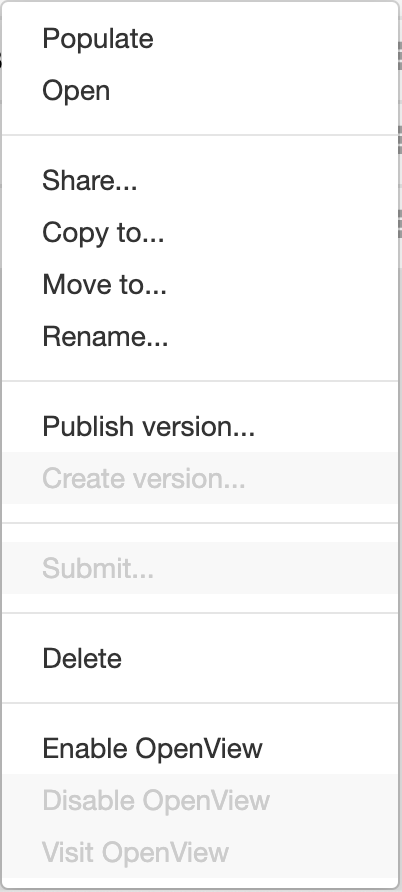
A metadata instance needs its template published as well, because the page draws the instance through the template that gave it structure. Until the template is published, a reader opening the instance sees an error in place of the metadata.
Enabling OpenView on a folder publishes that folder and everything below it, through every level of nesting. A resource inside such a folder stays published even if OpenView is disabled on the resource itself, so the folder is the thing to check when a resource is readable and you expected it not to be.
Reading a Published Resource
Choose Visit OpenView from a resource's menu to open its public page in a new tab. The address of that page is what you give to a reader, and it asks them for neither an account nor a permission.
A template, element, or field appears as an empty form showing its fields, and a metadata instance appears as a filled one. The down-arrow in the title bar unfolds the resource's metadata, among it a link that opens the document in CEDAR — which resolves only for a reader whose account may already view it. The foot of the page offers the raw representations, in JSON-LD and RDF, for anyone who wants the source rather than the rendering.
Withdrawing a Resource
Choose Disable OpenView from the menu of a published resource to withdraw it. Readers holding the address lose access from that moment.
Withdrawing a resource that a published folder contains takes more than the resource's own setting, since the folder continues to publish everything below it. Either move the resource out of that folder or disable OpenView on the folder.
What a Reader Never Sees
OpenView shows the published resource and nothing surrounding it. A reader sees no access control list, no folder path, no group membership and no user profile data, and no API reachable through OpenView permits a write. The permission model states these limits in full, alongside how a move between folders changes what is published.